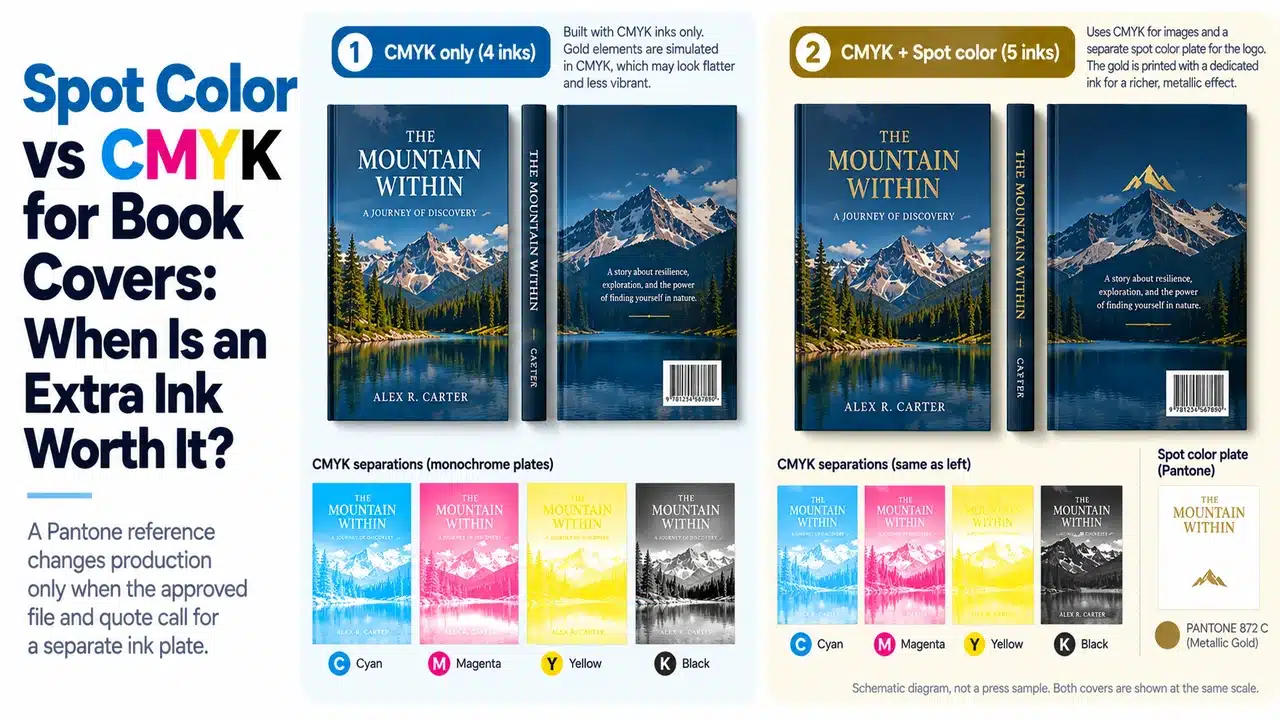
Look at the ink list in the final PDF. Does it show four process plates, or four plus a fifth plate named for the brand color? That is the useful place to begin a discussion of spot color vs CMYK for book covers. A Pantone reference in an email, an on-screen swatch and an actual spot-ink separation are three different things.
For an image-led hardcover, CMYK usually carries the photographs, illustrations and most typography. A separate spot ink earns its place when a prominent identity color cannot be reproduced acceptably in the agreed CMYK condition, or when the brand requires a specified ink across repeated production. The decision must be made for the finished component, including its paper and surface treatment, not from a monitor alone. The separate question of why printed color differs from a screen preview is covered in our color-management guide.
This is particularly relevant to a custom hardcover art book or a book jacket and slipcase set: each can combine photographic CMYK artwork with a brand color on more than one printed surface. PrintPack360’s product pages list CMYK and Pantone matching options for these routes. The quote and proof must still state exactly which components will receive an actual spot ink.
First, decide what the color is doing
CMYK builds color from cyan, magenta, yellow and black process inks. It is the normal route for full-color images and designs with many colors. Spot color is a separately specified ink, printed from its own separation. On a conventional offset job, CMYK plus one true spot color means five printing separations; whether they run in one pass depends on the press and production plan. Adobe explains this distinction in its guides to process colors and spot colors.
The question is therefore specific: Will the color be accepted as a process simulation, or must it be printed as its own ink? A printer can hold an agreed CMYK appearance on a defined stock without using a spot plate. Conversely, merely naming a Pantone swatch in artwork does not prove that the job has been quoted, separated or scheduled for spot-ink production. Adobe’s Ink Manager guidance explicitly allows spot colors to be converted to process colors at output.
When CMYK is the right specification
Keep the cover in CMYK when the color sits inside photographs or gradients, when the proposed process simulation is acceptable on the intended stock, or when the color is not the identity feature by which the edition will be judged. For a photography book with one modest publisher logo, the cover may gain nothing useful from a fifth ink if the logo can be approved in CMYK on the actual jacket paper.
Approve the process result as a process result. Pantone’s Color Bridge compares a solid spot color with a nearby printed CMYK simulation. It is a practical way to see whether a process version is an acceptable design choice. It does not make any CMYK percentages universal for every paper, profile and press. Pantone’s graphics guidance explains why software conversions can differ from the guide’s specified CMYK build and why printing workflows vary.
When a fifth ink earns the cost
Specify a true spot ink when the printed identity color is both prominent and commercially critical, and an approved CMYK proof fails that target. The same applies when a color must remain a separately controlled ink across reprints. Some bright, clean, metallic or fluorescent effects cannot be represented adequately by a standard four-color build; Adobe identifies spot inks as the route for exacting color matches and specialty effects. A fifth ink adds a plate and press work, so it belongs in the quotation from the start, not as an instruction discovered after approval.
This is a component-level decision. A jacket can merit CMYK plus a spot logo while the book interior stays CMYK. A cloth case with a gold-foil title is a different construction: conventional foil is a transfer and tooling operation, even though the artwork may use a named spot-color separation as its instruction. It is not a fifth printing ink. See the foil-on-book-cloth production guide for that separate process.
The book, jacket and slipcase do not share one print surface
A publisher may describe a collector set as “one Pantone blue,” yet the logo might appear on a laminated jacket, an uncoated printed case and a wrapped slipcase. Those surfaces can have different paper whites, absorption, coatings and viewing angles. The ink name is a common reference, not proof of identical appearance across materials. Pantone defines coated C and uncoated U by the stock on which the colors are printed; its CP and UP suffixes designate process simulations, not solid spot inks (Pantone graphics help center). The practical paper differences are covered in our coated-versus-uncoated book-paper guide.
For custom hardcover book printing, choose one visible component as the primary approval target and state how close the other components need to appear beside it. A book jacket and slipcase are often seen together in retail. A case hidden beneath the jacket may reasonably have a different approval priority. Where all three must appear coordinated, compare physical samples together under the same viewing light and after their intended finish has been applied.
| Component | Color decision to record | Evidence to approve |
|---|---|---|
| Printed paper case | CMYK or named spot ink; exact covering stock; lamination, if any | Printed and finished case-wrap sample, including the visible board face and turn-in |
| Dust jacket | CMYK or spot-ink plate; jacket stock; outer finish | Proof on the nominated stock plus finished jacket where lamination changes appearance |
| Printed slipcase wrap | Same brand reference or a separately approved adjustment; wrap stock and coating | Wrapped-board sample viewed beside the approved book and jacket |
| Cloth or dyed covering material | Material color and any foil/deboss specification | Actual material swatch and a finish test; CMYK numbers do not describe the cloth itself |
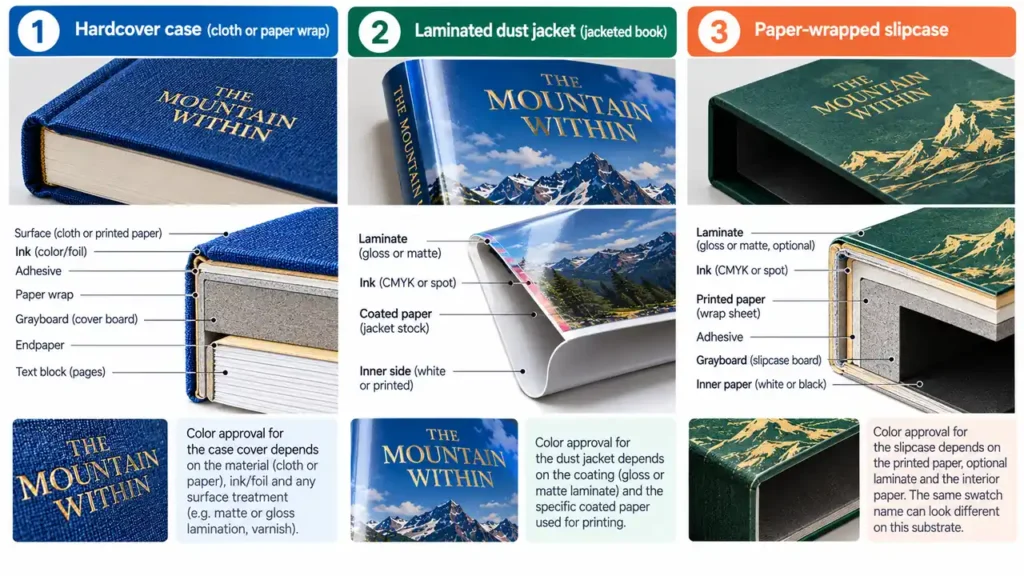
The table is a proposed approval method, not a claim that all four samples are mandatory for every order. If the publication has only a CMYK jacket and plain cloth case, the decision is much smaller. If it has three color-matched printed surfaces, one loose paper swatch cannot approve the finished set.
Run the two-sample test before buying another plate
Here is a practical decision sequence for a brand-led hardcover:
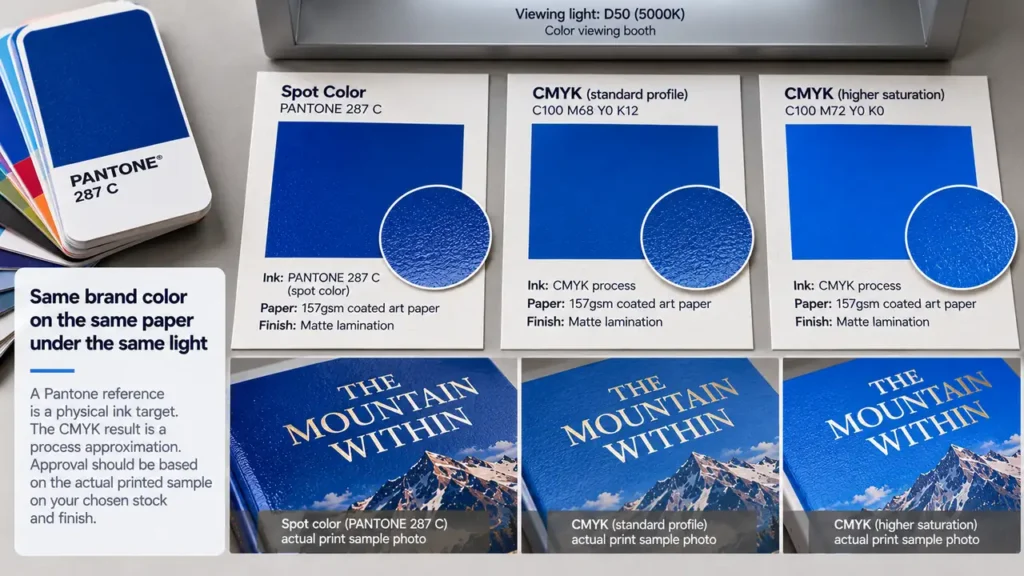
- Fix the reference. Name the Pantone solid reference, its
CorUsuffix, the actual production stock and the priority component. If the customer has an approved previous edition, identify that physical sample separately; do not silently substitute a screen image. - Request a process candidate. Ask for a CMYK proof made for the intended print condition on a representative paper. Treat any Color Bridge chip as a planning comparison, then inspect the job-specific proof.
- Compare at final scale. Place the proof beside the physical reference under agreed light. Check the largest visible color area, logo, adjacent photographs and any neutral border. A tiny chip may hide a mismatch that becomes obvious across a full jacket panel.
- If process fails, quote the spot route. Specify exactly which component receives the extra ink, whether the CMYK image remains, and whether another finish also needs its own tooling or separation. Ask whether the intended press configuration supports the proposed pass.
- Approve the finished surface. A loose spot-ink drawdown can establish an ink direction; it does not establish the effect of matte film, wrap adhesive, cloth texture or assembly. Use a representative finished sample for those decisions. PrintPack360’s sample strategy explains how to choose a sample that covers the actual approval risk.
This sequence has a clear stopping rule. If CMYK meets the approved physical target on the intended finished stock, use CMYK. If it does not and the color matters to the edition, specify the spot ink and approve a component-level proof. There is no universal numeric tolerance here: a measured acceptance limit must be agreed for the reference, instrument and production condition before it can be quoted as a requirement.
A named swatch can disappear before the press
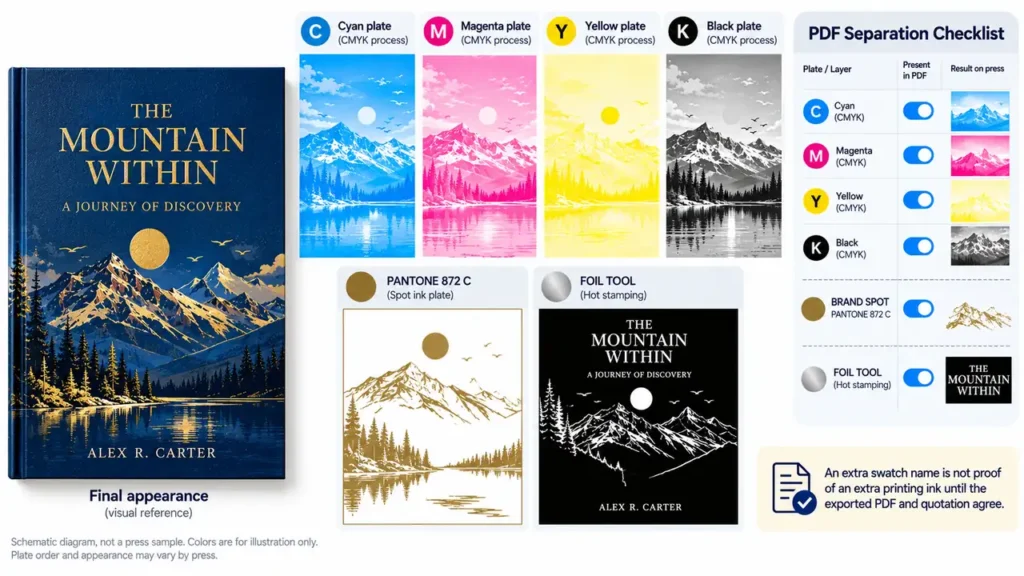
The final PDF is the production instruction. Open it in Acrobat Pro’s Output Preview, display the separations and confirm that the planned brand color exists as a separate plate. Then turn off that plate: the intended spot objects should disappear, and unrelated CMYK artwork should remain. Adobe’s Output Preview documentation describes plate-by-plate inspection and warns that on-screen preview does not replace proofing the final production settings.
Inspect the following before file release:
- One consistently named spot swatch represents the brand ink. A second swatch with a slightly different name can create an unwanted additional plate.
- The spot plate contains only the intended objects. A foil or spot-UV instruction has its own clearly named separation and is not mistaken for printing ink.
- Overprint and knockout settings are intentional, especially where the brand color crosses a CMYK image. Verify them in the exported PDF and with prepress; Adobe’s overprinting guide explains why overlapping inks can change the result.
- The written quotation names the same components and ink count as the PDF. A five-plate file attached to a four-color quotation is an unresolved production decision.
The broader hardcover cover-file setup guide deals with template geometry, fold and turn-in zones, and finishing layers. This article’s additional check is the color separation agreement: what the designer names, the printer quotes and the final PDF outputs must be the same.
FAQ
Can we use one Pantone number for the jacket and slipcase?
Yes, as a shared color reference. Approve each finished component separately if their stocks or finishes differ, then view them side by side. The same spot-ink name does not cancel the effect of paper white, surface and lamination.
Does specifying a Pantone color automatically add a spot-color plate?
No. The production quote and final separations decide that. A Pantone swatch may be converted to CMYK during output; verify a separate plate in the exported PDF if a true spot ink is required.
Why did my CMYK print differ from the Pantone Color Bridge chip?
Because the chip shows a process simulation under its own reference printing condition, while the job used another stock, profile, ink system or conversion. Compare a proof produced for the actual job, not four CMYK numbers detached from their output condition.
Related public discussion: Pantone versus CMYK in an InDesign print job.
Can a spot color be converted to CMYK reliably without a physical guide?
You can create a process approximation, but “reliably” must mean an approved result under a defined print condition. Use a current Color Bridge comparison to screen the idea, then approve a job-specific proof. A formula copied from another file or website cannot guarantee the same printed appearance.
Related public discussion: How to convert a Pantone reference to CMYK.