Adding three percentage points of magenta to every gray is a poor production instruction. It can improve one sample from one output condition and push the next run toward pink. Before changing the file, establish whether the gray was built incorrectly, converted unexpectedly or printed outside its intended condition.
CMYK gray balance is the relationship between process inks that produces the intended neutral appearance at a specified tone and printing condition. Equal cyan, magenta and yellow percentages do not automatically produce that appearance. Neither does an image become black-only because it looks black and white on screen.
For publishers, these distinctions show up in pale cover backgrounds, monochrome photographs and image captions. For brands ordering printed catalogs, they also affect neutral product backdrops: a cast can make a white object appear cream or a silver object appear green. The useful question is where the cast enters the workflow.
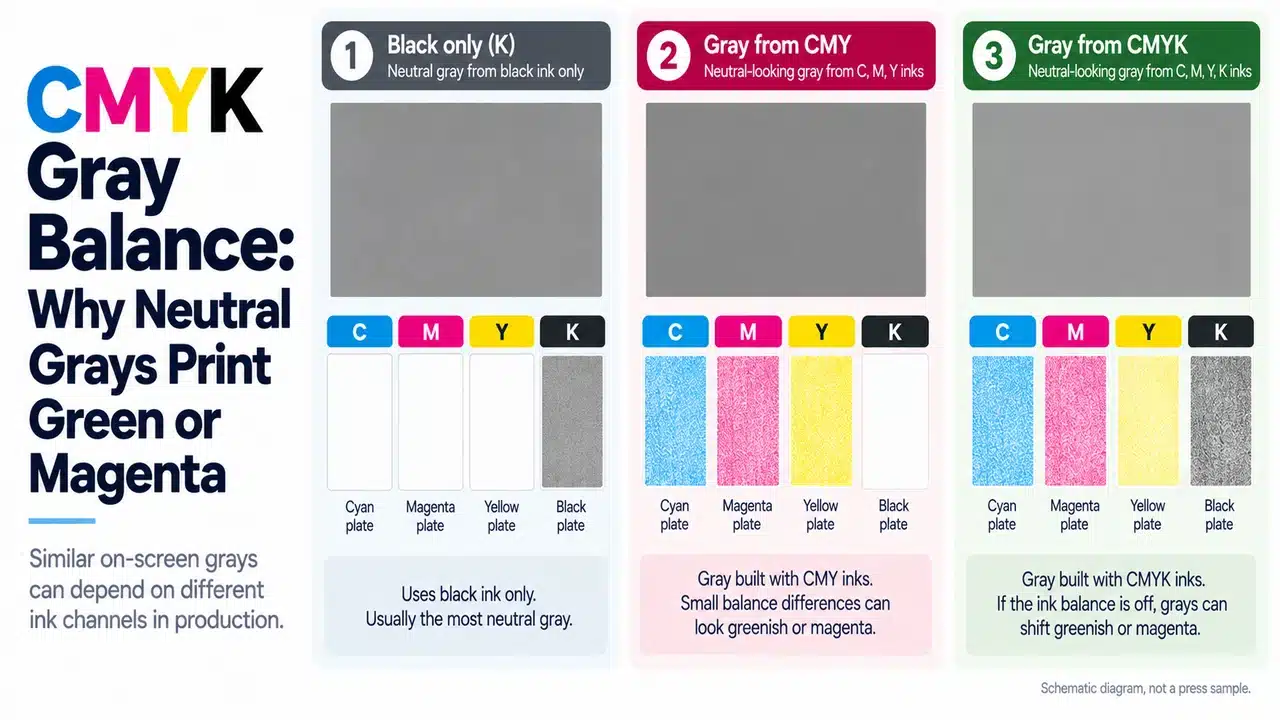
Three grays can look alike and print differently
A gray panel can be a tint of process black, a CMY mixture, or a four-color mixture containing black. On a display, all three can be rendered to look similar. On press, they depend on different colorants and respond differently when the printing condition changes.
Black-only gray uses the black separation alone. It removes the balance between cyan, magenta and yellow from that object, provided the output workflow preserves the single-color separation. It remains subject to black-ink shade, paper color, tone reproduction and surface appearance.
Composite gray uses more than one process ink. Its appearance depends on the relative contribution of those inks, including their printed tone values. A change in one channel can alter hue as well as lightness. A nominally neutral CMYK photograph may therefore develop a colored cast while adjacent black-only captions remain acceptable.
A desaturated RGB image has no visible color in the source preview, but its conversion can still generate cyan, magenta and yellow. Fogra’s Various Grays test page addresses the workflow issue directly: it compares gray encoded as DeviceGray, DeviceCMYK, DeviceN and Separation Black. The test is useful because color encoding and output handling can change the result even when the intended appearance is the same.
Keep dark cover construction separate from neutral midtones. The rich-black book-cover guide addresses dense black surfaces, ink coverage and finishing. A rich-black cover recipe is not a neutral-gray recipe for photographs or pale backgrounds.
What a green or magenta cast actually tells you
In a composite gray, relatively stronger cyan and yellow, or a weaker magenta contribution, can move the appearance toward green. A stronger magenta contribution can move it toward a magenta cast. That describes a direction; it does not identify the failing stage or authorize an ink adjustment.
The file may already contain the imbalance. A conversion may have changed the separation. On an offset press, ink transfer, tone value increase and wet trapping can change the effective balance of the printed channels. A digital output can introduce a different set of calibration and color-management issues. Paper and finish then affect the appearance of both black-only and composite gray.
A photograph of a green-looking sheet is insufficient evidence for a universal magenta correction. First compare the sheet with the approved reference under the same light. If the disagreement exists only between the print and a personal display, follow the screen-to-print color-management workflow before changing the artwork.
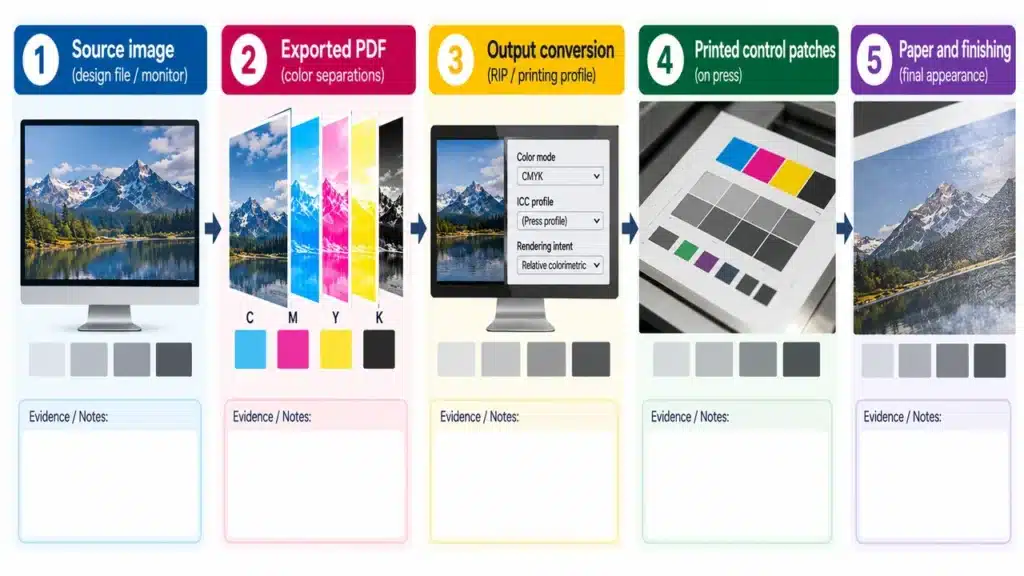
The pattern across the sheet is more useful than the color name alone:
| Observed pattern | Next comparison | Decision it supports |
|---|---|---|
| CMY/composite grays have a cast; black-only tints are close to the reference | File separations, CMY control patches and single-channel tone values | Investigate the composite separation or process balance first |
| Both black-only and composite grays differ from the reference | Paper white, viewing light, finishing, black behavior and output handling | The problem is broader than one CMY recipe |
| One image has a cast while comparable control patches and neighboring images pass | Embedded profile, local edits and the image’s final PDF values | A local file problem is a stronger candidate |
| Approved early sheets pass; later sheets drift using the same file | Retained sheets in run order and corresponding control measurements | Restore process control before compensating the master file |
| Raw sheets pass; finished samples differ | Matched unfinished and finished samples from the same print condition | Investigate the surface treatment and its approval target |
These are diagnostic routes, not conclusions based on sight alone. Several faults can coexist. Keep the reference sample and the affected output available until prepress and production have compared them.
Measure CMYK gray balance with defined control patches
PRINTING United Alliance’s January 2026 article on maintaining a G7 print condition lists these CMY control patches:
| Control patch | Cyan | Magenta | Yellow |
|---|---|---|---|
| Highlight range, HC | 25% | 19% | 19% |
| Midtone, HR | 50% | 40% | 40% |
| Shadow range, SC | 75% | 66% | 66% |
Their unequal percentages illustrate why an equal-CMY rule is inadequate. They are defined control elements for that calibration method, not three recommended background swatches for every book. Use the reference values and calculation method associated with the agreed print condition. The same Alliance guidance explains that gray-balance and neutral-density aims depend on the substrate and printing combination.
Ask production for the selected gray controls, black-only controls and the target used to evaluate them. Record whether the problem is a hue difference, a lightness difference or both. Also record instrument settings, measurement backing and the state of the sample. Do not combine measurements made under different conditions and treat them as one trend.
A balanced gray scale also does not prove that every brand color or overprint is correct. Neutral control is one part of the print condition. Color-critical work still needs the agreed solids, overprints and representative image content checked.
A historical TAGA sheetfed-offset study compared tone-reproduction calibration methods and reported one approach that compromised gray balance toward the shadows while improving skin-tone matching. This illustrates a real separation and calibration trade-off. It does not establish a modern production tolerance or justify sacrificing the customer’s approved neutral target.
Choose the separation for the image, then preserve it
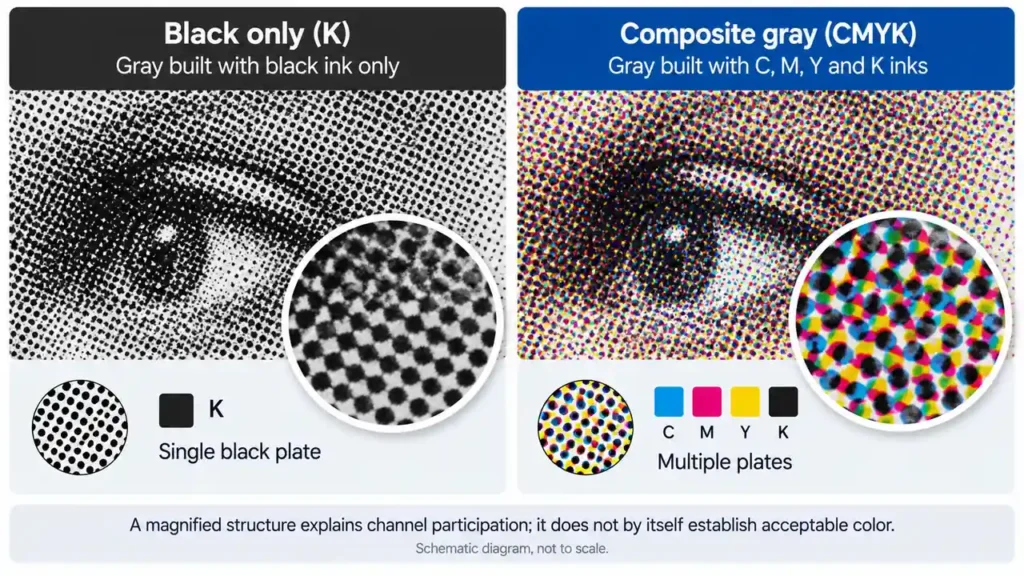
For simple gray typography, rules and neutral vector panels that can be approved as black tints, black-only construction avoids dependence on three chromatic channels. Set the intended values explicitly and inspect the exported PDF. Do not assume a gray RGB swatch will become a black-only tint during conversion.
For a monochrome photograph, decide what matters: neutral stability, depth, smooth highlights, visible screening and the chosen paper. Black-only reproduction and a controlled multi-ink separation have different tonal possibilities. Request representative prints before selecting the route for an entire photography book. An approved black-only image is not automatically improved by converting it to four colors.
Gray component replacement, or GCR, is a third decision. It replaces an appropriate share of the chromatic gray component with black during separation. Heidelberg’s Prinect black-generation documentation explains its role in stabilizing printing and reducing chromatic ink use. It also identifies trade-offs: aggressive black generation can make the black screen more noticeable, and black in light skin tones can impair appearance.
GCR must therefore be selected through a qualified profile or separation workflow. It is not a manual instruction to subtract equal amounts of CMY and add the same percentage of K. Nor should an approved CMYK file be repeatedly reconverted in search of a neutral-looking preview. Preserve the source, identify the destination condition and confirm which stage performs the conversion.
For a casebound hardcover art book, specify monochrome-image treatment together with the production paper and proof. If the paper changes, review the neutral target again. The coated-versus-uncoated paper guide explains why paper selection belongs in that decision.
The correction belongs at the stage that failed
Use this release procedure before approving a change:
- Freeze the evidence. Retain the supplied PDF, approved proof, suspect sheet, stock specification and any finished sample. Identify the page and tone range that fails.
- Inspect the PDF separations. Determine whether the affected object is black-only, composite CMYK or another color space. Compare its values with the source file and approved proof workflow.
- Check output treatment. Ask prepress whether black-only objects remain single-color through the RIP. Adobe provides black-preservation and CMYK-primary preservation controls; the existence of these options does not confirm the printer’s actual settings.
- Compare the relevant controls. Use CMY and black-only scales appropriate to the print condition. Evaluate the affected image separately if the controls pass.
- Correct the failing stage and reproof it. Revise artwork when its separation or intended tone is wrong. Correct conversion when output handling altered it. Restore the calibrated production condition when later sheets drift from an accepted start.
For sampling, send the problem pages rather than asking for a generic full-color sample. Include the palest gray, a midtone, a dark neutral, fine text and the actual monochrome photograph. State whether the approval covers the raw sheet or a laminated cover. PrintPack360’s sample strategy provides the route for discussing that scope.
The approval record should identify one master file revision and one physical target. A separate “corrected gray” file for each uncontrolled output makes the next reprint harder to diagnose.
FAQ
Can the color cover and monochrome pages use different separation methods?
Yes. Specify the interior image treatment separately from the cover. A CMYK cover does not require black-and-white interior photographs to use all four inks. Confirm the file construction, production plan and proof for each component.
Should pale gray backgrounds be approved after lamination?
Yes, when the final product is laminated and its finished appearance is critical. Retain a raw-sheet comparison as well: it helps distinguish printing variation from the effect of the surface treatment. Use the final approved stock and film rather than a generic laminated swatch.
Should I add a fixed amount of magenta when gray prints green?
No. Confirm the reference, separation and production condition first. A targeted file adjustment is justified only after a controlled proof demonstrates that the existing file misses the intended result under a stable output condition. A correction chosen to compensate for a drifting printer can fail on the next run.
Related public discussion: A March 2026 question about gray printing green.
Why does a black-and-white image still contain CMY in the PDF?
Desaturation changes appearance; it does not necessarily change the image to a single black separation. Inspect the exported PDF’s channels. If black-only output is required, prepare it for that route and confirm that subsequent conversion and RIP handling preserve it.
Related public discussion: Preparing a black-only grayscale image within a CMYK workflow.