Introduction: Understanding Print Processes
Welcome to PrintPack360’s comprehensive guide on printing processes. Understanding the different printing techniques available is crucial for achieving optimal results in your projects while managing costs effectively.
The printing process you choose will fundamentally impact:
- Quality: Resolution, color accuracy, and detail reproduction
- Cost: Setup costs, per-unit costs, and minimum order quantities
- Turnaround Time: Production speed and flexibility
- Sustainability: Environmental impact and ink characteristics
In this guide, we’ll explore five major printing processes used in the industry today, helping you make informed decisions for your specific needs.
1. Offset Printing (Lithography)
What is Offset Printing?
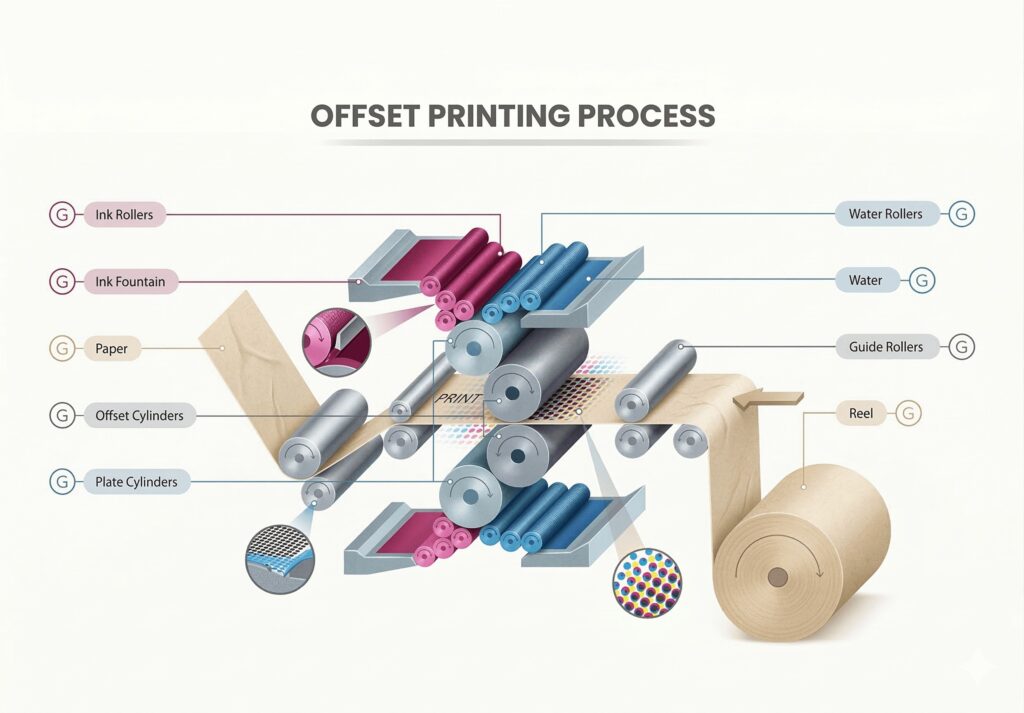
Offset printing, also known as lithography, is the workhorse of the commercial printing industry. It accounts for approximately 40% of all printed material worldwide. The process uses a flat (planographic) printing plate where the image and non-image areas are on the same plane.
How It Works
- Plate Creation: Image is burned onto aluminum plate
- Ink Application: Plate is treated to attract ink on image areas
- Transfer to Blanket: Ink transfers to rubber blanket cylinder
- Paper Transfer: Paper passes between blanket and impression cylinder
- Final Output: Ink transfers from blanket to paper
This “offset” (indirect) transfer is what gives the process its name and provides several advantages.
Types of Offset Printing
Sheet-Fed Offset
Best For:
- High-quality books and catalogs
- Commercial brochures
- Direct mail pieces
- Packaging prototypes
Characteristics:
- Individual sheets fed into press
- Higher quality registration
- Better for specialty papers
- Slower setup than web press
Web Offset (Roll-Fed)
Best For:
- Newspapers
- Magazines
- High-volume catalogs
- Direct mail
Characteristics:
- Continuous paper roll feed
- Faster production speeds
- Lower per-unit cost at high volumes
- Limited paper choices
Technical Specifications
| Specification | Sheet-Fed | Web Offset |
|---|---|---|
| Speed | 10,000-15,000 sph | 30,000+ sph |
| Image Size | Up to 40″ x 60″ | Up to 56″ cut-off |
| Color Capability | 1-8 colors | 1-6 colors |
| Paper Weight | 40-400gsm | 35-150gsm |
Advantages
- ✅ Highest print quality available
- ✅ Excellent color consistency
- ✅ Economical at high volumes
- ✅ Wide range of paper compatibility
- ✅ Sharp text and fine lines
- ✅ Suitable for Pantone colors
Limitations
- ❌ High setup costs (plates, makeready)
- ❌ Not cost-effective for short runs
- ❌ Longer production time
- ❌ Minimum order quantities typically apply
Cost Breakdown
Setup Costs:
- Plate making: $50-150 per color per side
- Makeready: $200-500
- Art preparation: Variable
Per-Unit Costs:
- 1,000 units: $0.50-2.00 per page
- 10,000 units: $0.05-0.30 per page
- 100,000 units: $0.01-0.10 per page
2. Digital Printing
What is Digital Printing?
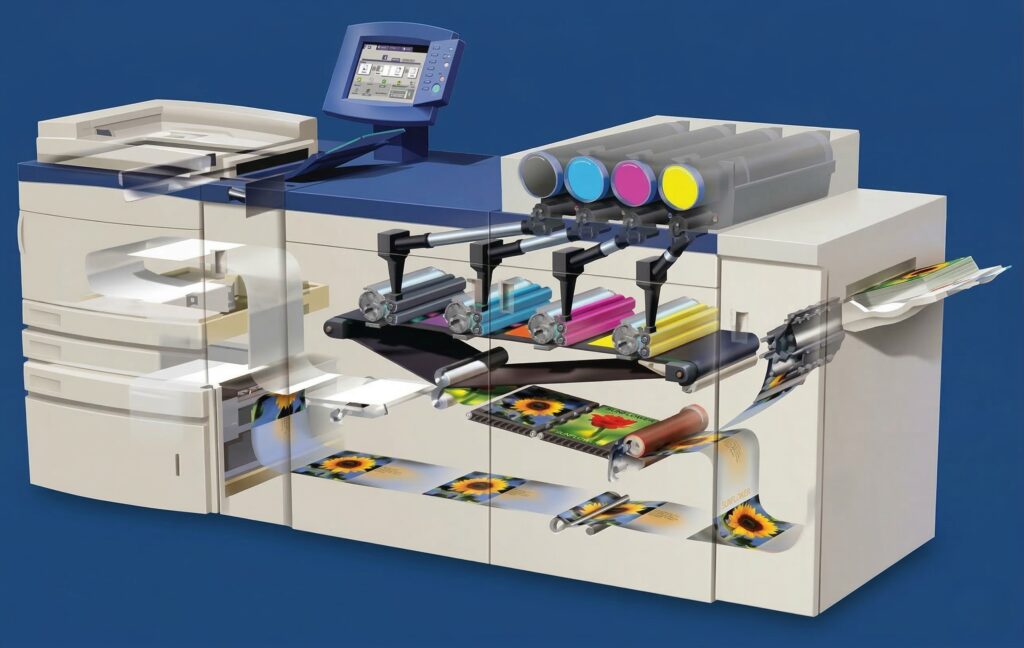
Digital printing represents a paradigm shift in the printing industry. Unlike traditional methods that require plates, digital printing transfers images directly from computer to paper, eliminating many traditional setup requirements.
Types of Digital Printing
Inkjet Digital Presses
How It Works:
- Microscopic ink droplets sprayed onto paper
- Variable droplet sizes for tone reproduction
- CMYK + optional additional colors (orange, green, violet)
- Near-photographic quality possible
Best For:
- Short-run books
- Personalized marketing
- Prototypes
- Variable data printing
Leading Brands:
- HP Indigo
- Kodak Nexpress
- Fuji Xerox
Laser/Electrophotographic
How It Works:
- Toner fused onto paper surface
- Consistent, accurate color
- Excellent for text
- Faster than inkjet for text
Best For:
- Documents
- Manuals
- Short-run booklets
- Business cards
Leading Brands:
- Canon imagePRESS
- Ricoh Pro
- Konica Minolta
Digital vs. Offset: A Comparison
| Factor | Digital | Offset |
|---|---|---|
| Setup Cost | Very Low | High |
| Per-Unit Cost (Low Volume) | Lower | Higher |
| Per-Unit Cost (High Volume) | Higher | Lower |
| Quality | Excellent | Exceptional |
| Color Matching | Good | Excellent |
| Paper Choice | Limited | Extensive |
| Turnaround | 1-3 days | 5-14 days |
| Personalization | Excellent | Limited |
When to Choose Digital Printing
Choose Digital When:
- Order quantity is under 1,000
- You need personalization (names, codes)
- Fast turnaround is critical
- You’re prototyping
- Inventory is a concern
- Distribution is widespread/geographic
Advantages
- ✅ No minimum quantity
- ✅ Quick turnaround
- ✅ Personalized printing (each copy different)
- ✅ Low setup costs
- ✅ Easy file modifications
- ✅ Just-in-time inventory possible
Limitations
- ❌ Higher per-unit cost at volume
- ❌ Limited paper selection
- ❌ Color consistency across runs can vary
- ❌ Larger image sizes limited on some equipment
Cost Considerations
Per-Unit Costs:
- Business cards (100): $15-30/set
- Booklets (100): $3-8 each
- Posters (50): $10-25 each
- Short-run books (500): $5-15 each
Costs vary significantly by vendor, equipment, and specifications.
3. Flexography
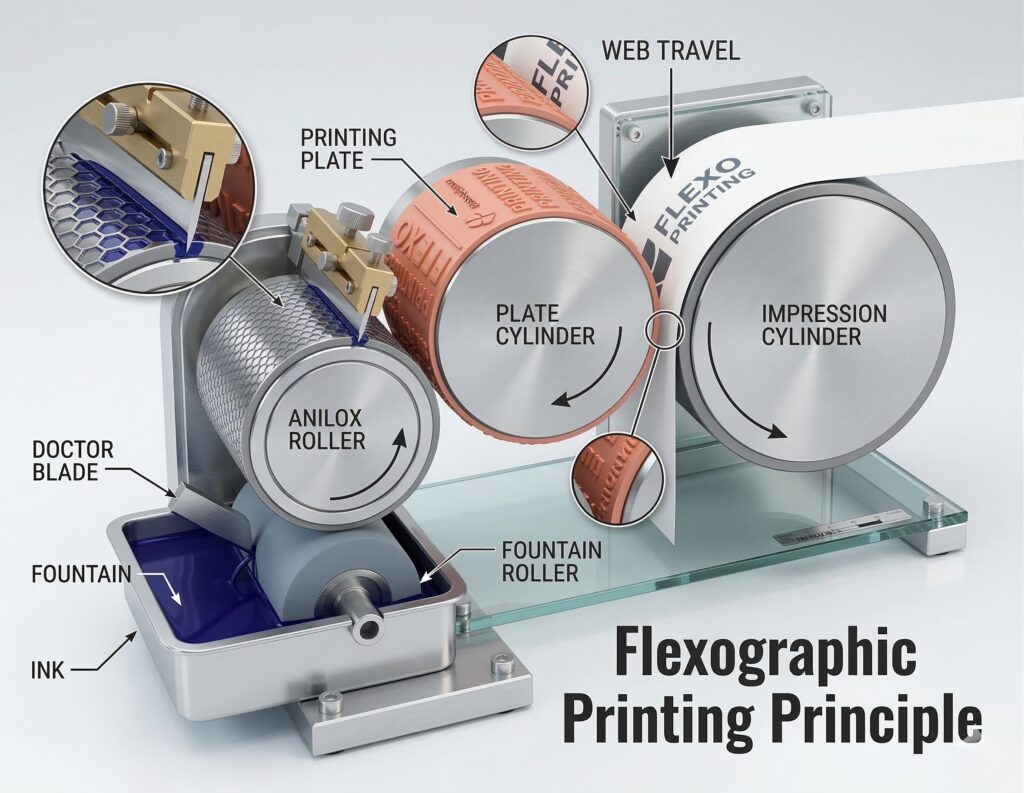
What is Flexography?
Flexography (often called “flexo”) is a versatile relief printing process that uses flexible rubber or photopolymer plates. It’s one of the fastest-growing printing technologies, particularly in packaging.
How It Works
- Plate Preparation: Image raised on flexible plate
- Ink Application: Anilox roll meters precise ink amount
- Plate Contact: Plate contacts paper/packaging material
- Transfer: Raised image transfers ink to substrate
- Drying: Inline drying system cures ink
Applications
Primary Uses:
- Corrugated boxes
- Flexible packaging (bags, pouches)
- Labels and stickers
- Wallpaper
- Newspapers (in some regions)
Technical Specifications
| Specification | Details |
|---|---|
| Resolution | 65-150 lpi |
| Press Speed | 500-2,000 fpm |
| Colors | 1-8 stations typical |
| Substrates | Paper, film, foil, corrugated |
Advantages
- ✅ Excellent for packaging
- ✅ Works on various substrates
- ✅ Fast production speeds
- ✅ Cost-effective for long runs
- ✅ Good color density
Limitations
- ❌ Lower resolution than offset
- ❌ Limited to simpler graphics
- ❌ Plate costs add up for multiple colors
4. Screen Printing
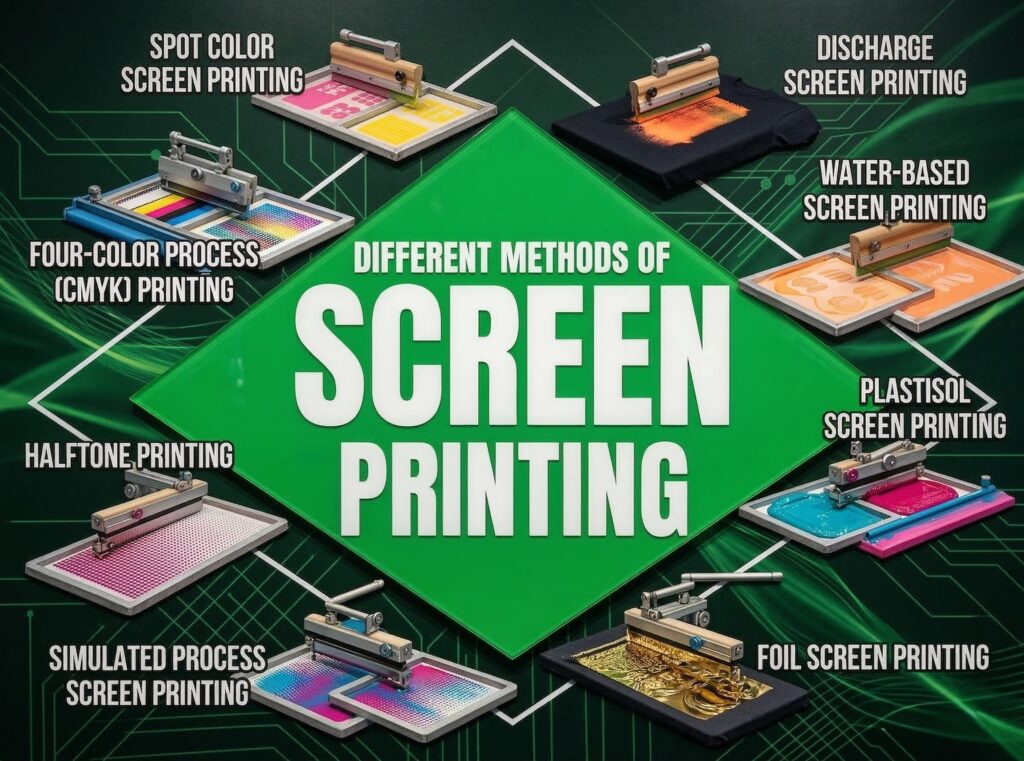
What is Screen Printing?
Screen printing (silkscreen, serigraphy) is a versatile stencil technique where ink is pushed through a mesh screen onto the substrate. It’s one of the oldest and most adaptable printing methods.
How It Works
- Screen Preparation: Photopolymer emulsion applied to mesh
- Image Exposure: Film positive placed on screen, UV exposure
- Washout: Non-image areas wash away, creating stencil
- Ink Application: Squeegee pushes ink through open mesh
- Curing: Heat or UV cures the ink
Types of Screen Printing
Flatbed Screen Printing
Best For:
- T-shirts and apparel
- Ceramic and glass
- Electronics
- Signs and displays
Rotary Screen Printing
Best For:
- Continuous patterns
- Textiles
- Packaging
- High-volume production
Technical Specifications
| Specification | Details |
|---|---|
| Mesh Count | 40-400 threads/inch |
| Ink Deposit | 10-100+ microns |
| Resolution | 70-305 lpi |
| Image Size | Up to 4′ x 8′ or continuous |
Applications by Industry
| Industry | Applications |
|---|---|
| Apparel | T-shirts, jerseys, uniforms |
| Graphics | Banners, signs, decals |
| Electronics | Circuit boards, membranes |
| Packaging | Boxes, containers |
| Ceramic | Mugs, tiles, plates |
Advantages
- ✅ Works on virtually any substrate
- ✅ Thick ink deposit for durability
- ✅ Vibrant colors on dark materials
- ✅ Economical for simple graphics
- ✅ Specialty inks (metallic, glow, 3D)
- ✅ Long-lasting outdoor durability
Limitations
- ❌ Not ideal for photographic images
- ❌ Setup per color
- ❌ Slower than digital/offset for complex work
- ❌ Registration can be challenging
Cost Structure
Setup Costs:
- Screen creation: $30-75 per color
- Art preparation: Variable
- Ink mixing: $20-50 per color
Per-Unit Costs:
- Simple 1-color: $1-5 per unit
- Multi-color: $3-15+ per unit
- Specialty inks: Add 50-100%
5. Gravure Printing
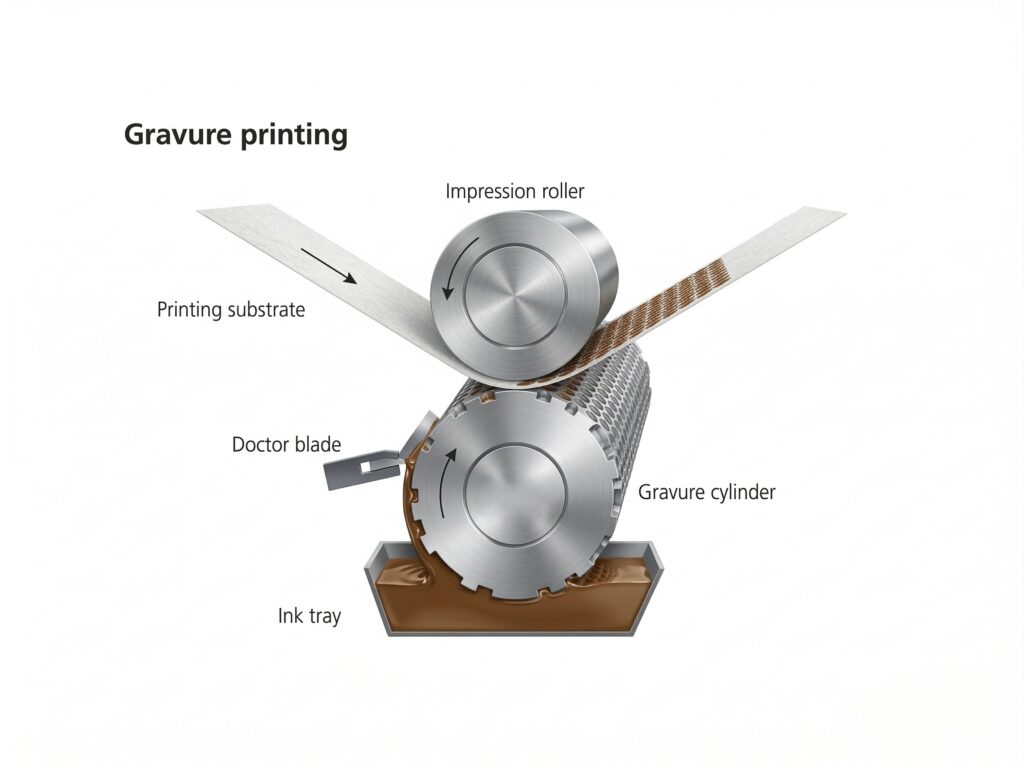
What is Gravure Printing?
Gravure (intaglio) printing uses engraved copper cylinders to hold ink in tiny cells. It’s one of the highest-quality printing methods available, capable of producing exceptional detail and color consistency.
How It Works
- Cylinder Preparation: Image engraved into copper cylinder
- Ink Application: Entire cylinder immersed in ink
- Doctor Blade: Blade scrapes excess ink from surface
- Ink Transfer: Paper pressed against cylinder
- Cell Transfer: Ink from cells transfers to paper
Characteristics
| Specification | Details |
|---|---|
| Quality | Highest of all processes |
| Resolution | Up to 175+ lpi |
| Press Speed | 1,000-3,000 fpm |
| Run Length | 1 million+ copies |
Best Applications
Ideal For:
- Long-run packaging
- Currency and security printing
- High-end magazines
- Catalogs with fine detail
- Decorative laminates
Advantages
- ✅ Exceptional print quality
- ✅ Excellent for continuous tones
- ✅ Superior color consistency
- ✅ Extremely long runs economical
- ✅ Fine detail reproduction
Limitations
- ❌ Very high cylinder engraving costs
- ❌ Not economical for short runs
- ❌ Limited flexibility for changes
- ❌ Complex equipment
Cost Breakdown
Setup Costs:
- Cylinder engraving: $500-3,000 per color
- Extendedmakeready: $1,000-5,000+
Per-Unit Costs:
- 10,000 units: $0.15-0.50 per page
- 100,000 units: $0.02-0.10 per page
- 1,000,000+ units: $0.005-0.02 per page
6. Choosing the Right Process
Decision Framework
Step 1: Determine Quantity
| Quantity | Recommended Process |
|---|---|
| 1-500 | Digital |
| 500-5,000 | Digital or Sheet-Fed Offset |
| 5,000-50,000 | Web Offset or Flexo |
| 50,000+ | Gravure or Flexo |
Step 2: Evaluate Quality Requirements
| Quality Level | Best Process |
|---|---|
| Basic | Digital, Flexo |
| Standard | Offset, Digital |
| High | Sheet-Fed Offset |
| Premium | Gravure |
Step 3: Consider Substrate
| Substrate | Recommended Process |
|---|---|
| Standard Paper | Offset, Digital |
| Cardstock | Offset, Digital, Screen |
| Film/Plastic | Flexo, Screen |
| Fabric | Screen, Digital |
| Metal | Screen |
| Corrugated | Flexo |
Step 4: Analyze Special Requirements
| Requirement | Best Process |
|---|---|
| Personalization | Digital |
| Quick Turnaround | Digital |
| Long Run | Gravure, Flexo |
| Specialty Inks | Screen |
| Variable Data | Digital |
Process Selection Quick Reference
| Project Type | First Choice | Alternative |
|---|---|---|
| Business Cards | Digital/Offset | Screen (specialty) |
| Brochures | Offset | Digital |
| Books | Offset | Digital |
| Short-Run Books | Digital | – |
| Packaging | Flexo | Offset |
| Labels | Digital/Flexo | Screen |
| Apparel | Screen | Digital |
| Large Format | Digital | Screen |
7. Post-Print Finishing
What is Post-Print Finishing?
Post-print finishing refers to all processes applied after printing to enhance appearance, durability, or functionality.
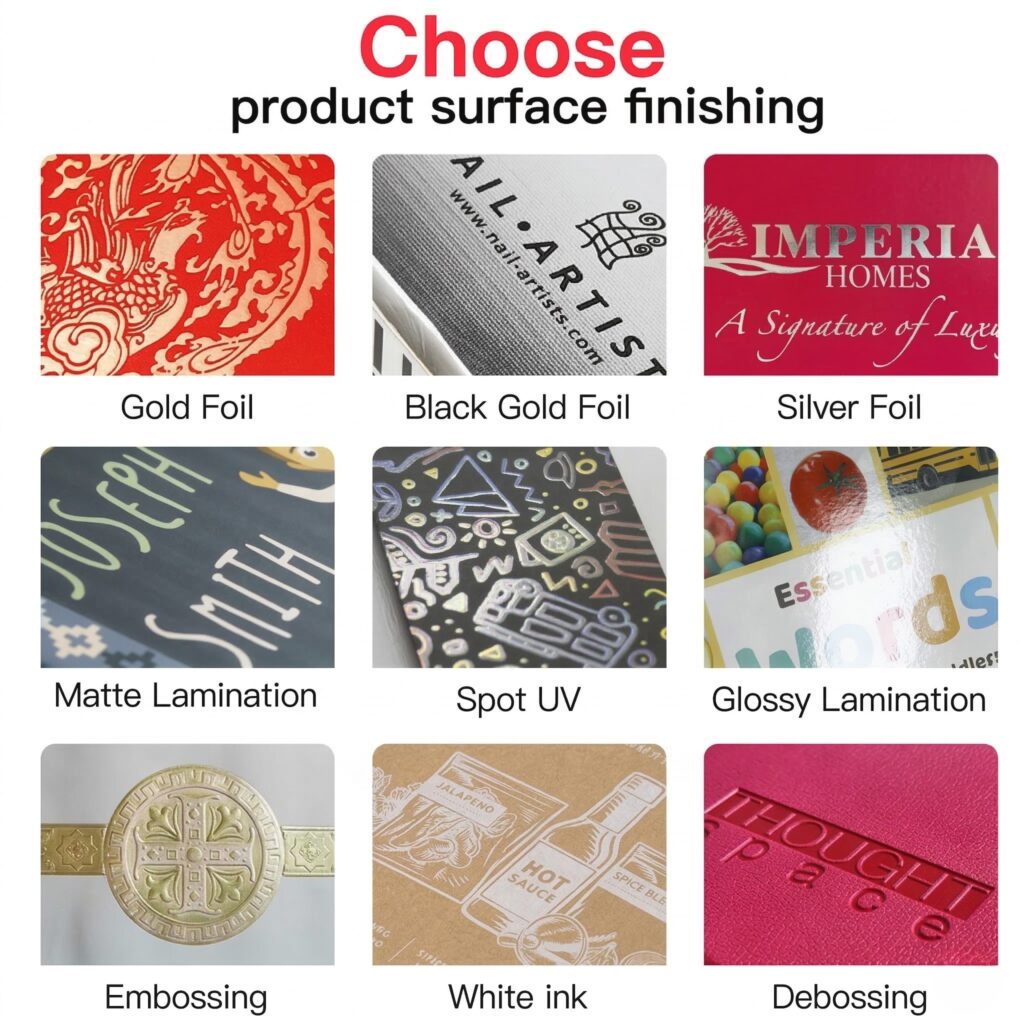
Common Finishing Options
Lamination
- Gloss Lamination: High shine, vibrant colors
- Matte Lamination: Subtle, elegant finish
- Soft-Touch Lamination: Velvet-like texture
UV Coating
- Spot UV: Selective glossy areas
- Full UV: Overall gloss and protection
Embossing/Debossing
- Creates raised (emboss) or sunken (deboss) texture
- Adds tactile dimension
Foil Stamping
- Metallic foil applied to surface
- Gold, silver, copper, holographic options
Die Cutting
- Custom shapes
- Packaging and promotional products
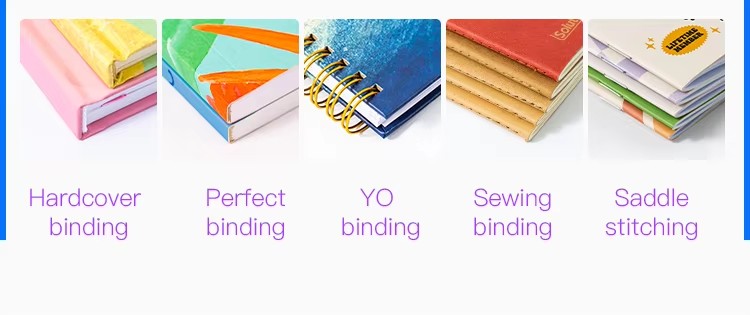
Binding
- Saddle stitch
- Perfect binding
- Spiral binding
- Case binding
Conclusion
Understanding the various printing processes is essential for making informed decisions about your projects. Each method has unique strengths and ideal applications:
- Offset Printing: Best for high-quality, medium to long runs
- Digital Printing: Ideal for short runs and personalization
- Flexography: The packaging industry standard
- Screen Printing: Perfect for specialty applications and apparel
- Gravure Printing: Ultimate quality for long-run packaging
At PrintPack360, we have expertise across all major printing processes. Our team will help you select the optimal method for your specific project requirements, budget, and timeline.
Get Started Today
📧 Email: info@printpack360.com
🌐 Website: www.printpack360.com
📞 Phone:+86 15056500929
About PrintPack360
PrintPack360 is your trusted partner for all printing needs. From concept to completion, we deliver exceptional quality with competitive pricing and fast turnaround times.
We offer extensive options for FSC-certified paper stocks, ensuring your corporate sustainability goals are met while maintaining superior print fidelity.